Release Notes > 6.5.0
Webiny 6.5.0 Changelog
See what's new in Webiny version 6.5.0
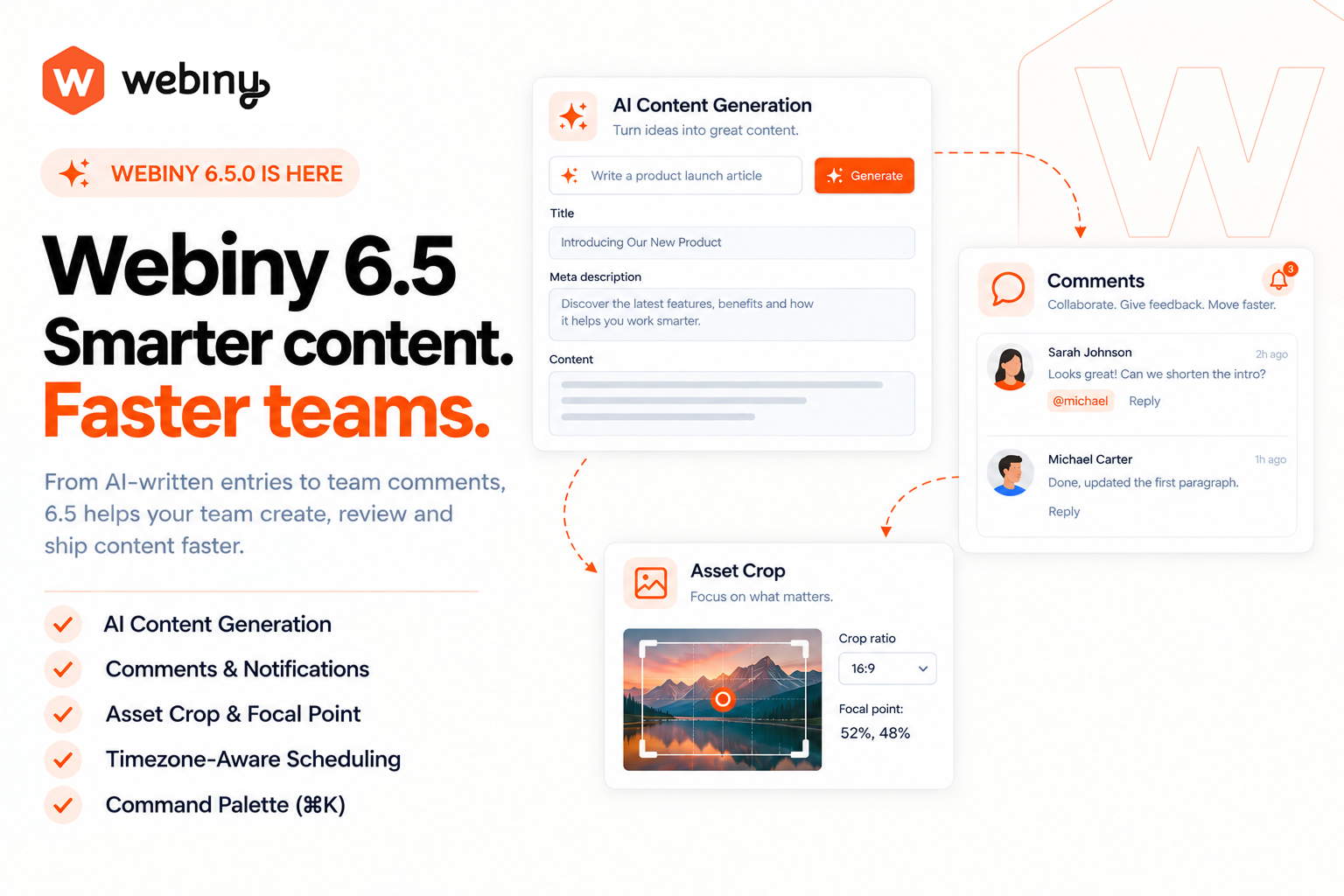 Webiny 6.5 highlights: AI content generation, comments and notifications, asset crop and focal point, timezone-aware scheduling, and the command palette
 release on GitHub.
Headless CMS
AI-Powered Content Generation (#5333)
You can now generate CMS entry content using AI directly from the entry editor. A new AI button in the editor header opens a prompt dialog — describe what you want, and the generated content populates your entry fields in real time via WebSocket. The system understands your model’s schema including nested objects, dynamic zones, validation rules, and predefined values. Rich text fields receive proper Lexical editor state through an internal conversion pipeline.
Configurable New Entry Wizard (#5354)
You can now inject a custom wizard UI that appears before the entry form opens. This lets you gather initial values (e.g., from a template selector or AI prompt) and pre-fill the form with those values already marked as dirty.
import { ContentEntryEditorConfig } from "webiny/admin/cms/entry/editor";

<ContentEntryEditorConfig>
  <ContentEntryEditorConfig.NewEntryWizard
    element={<YourWizardComponent />}
    modelIds={["article", "blogPost"]}
  />
</ContentEntryEditorConfig>
Redesigned Content Model Editor (#5259,#5289,#5290)
The content model editor has been significantly redesigned. The Edit/Preview tabs now appear as a segmented control in the top bar. The fields sidebar collapses into an 80×80 icon grid with smooth animations. Field cards have been restyled with field-type icons and updated typography. Drag-and-drop uses a proper cursor overlay with label and icon instead of the previous orange circle, and drop zones have cleaner styling. The settings panel now opens in a drawer instead of a full-screen overlay. The preview tab shows a friendly empty state with an illustration and “Switch to edit mode” button when no fields exist.
New Revision Button for Published and Unpublished Entries (#5352,#5353,#5347)
When editing a published or unpublished entry, you now see a “New Revision” button alongside “Publish”. Previously, if an entry was published and then unpublished, the UI didn’t make it clear how to create a new revision. The “All Revisions” option is now always visible in the revisions dropdown, and saving a locked entry automatically creates a new revision instead of failing.
Refactored CMS Architecture With Presenter/Feature Pattern (#5323)
Content entries, content models, and related modules have been refactored to use a new presenter/feature architecture with dependency injection. Key improvements include:
- Folder creation no longer triggers a full
ListFoldersreload — the cache is populated from the create response - Sorting by name now works correctly for both folders and entries
- The
app-headless-cms-commonpackage is now types-only, reducing bundle size
AI-Powered Entry Creation Wizard (#5356)
You can now enable AI-assisted content generation when creating new CMS entries. A new “Generate with AI” toggle in Model Settings (settings.aiEntryWizard) controls whether new entries open with an inline AI content generation form. When enabled, the wizard pre-fills the entry form with AI-generated content based on your prompt. A skip button lets you bypass the wizard and start with an empty form.
The wizard system now supports priority-based registration, so custom wizards can override the default AI wizard when needed.
NewgetModelSDK Method With Wildcard Field Expansion (#5435)
The SDK now exposes a getModel method that returns full model definitions including field metadata. It supports wildcard field expansion for nested structures and automatically resolves referenced models, making it easier to build dynamic rendering logic based on your content model schema.
Stricter Datetime Field Validation (#5435)
The API now enforces format validation on datetime fields. Previously, malformed date strings could be saved without error. Invalid formats are now rejected at the API level with a descriptive validation message.
Entry Revision Comparison Moved to AI Powerups (#5485)
The CMS entry revision comparison feature has been relocated from the /extensions folder into the @webiny/ai-powerups package. This change consolidates AI-powered features in a single package and adds proper architectural layering with UseCase, Repository, and Gateway patterns. The compareEntryRevisions GraphQL query is now nested under CmsQuery, accessed via cms { compareEntryRevisions(...) }.
New Asset Field With Non-Destructive Crop and Focal Point (#5452)
A new first-class Asset field replaces the bare-URL file field for images. It stores crop coordinates, focal point, alt text, and caption — all non-destructively. The original file is never modified; edits are applied server-side at delivery time, producing a URL that works with any frontend framework.
import { fields } from "webiny/api-headless-cms";

const model = {
  fields: [
    fields.asset("heroImage").imagesOnly(),
    fields.asset("document").accept(["application/pdf"])
  ]
};
The Asset field exposes a resolved url in the read API with crop and focal point baked in, so frontends get a turnkey URL without knowing the delivery-param contract. The underlying src remains the pristine original.
Image editor — File Manager, CMS file fields, and the new Asset input all share the same crop/focal-point editor. Choose from aspect-ratio presets or enter a custom ratio; a live preview shows the result.
Delivery URL parameters — ?crop=t,l,b,r, ?aspectRatio=16:9, and ?focal=x,y join the existing ?width, ?format, and ?quality params. The server computes the largest rectangle of the requested aspect ratio inside the crop, centered on the focal point.
Existing content models using the file field will continue to work. You can migrate to the new asset field type when convenient.
Scheduled Publish/Unpublish State Now Visible Across the CMS UI (#5441)
Previously, scheduled publish/unpublish actions were only visible inside the schedule dialog. Now the scheduled state appears everywhere users expect to see publish status:
- Entries list “Live” column: Shows a
Scheduledpill with the go-live time when an entry has a pending action. Entries can display both “Live” and “Scheduled” simultaneously when an older revision is live and a newer one is queued. - Entry form banner: An amber info banner appears above the form when the open entry has a scheduled action.
- Publish/Unpublish confirm dialogs: A warning appears when the entry has a scheduled action, explaining that publishing now will cancel the scheduled action.
The UI refreshes automatically when you schedule, cancel, publish, or unpublish — no page reload required.
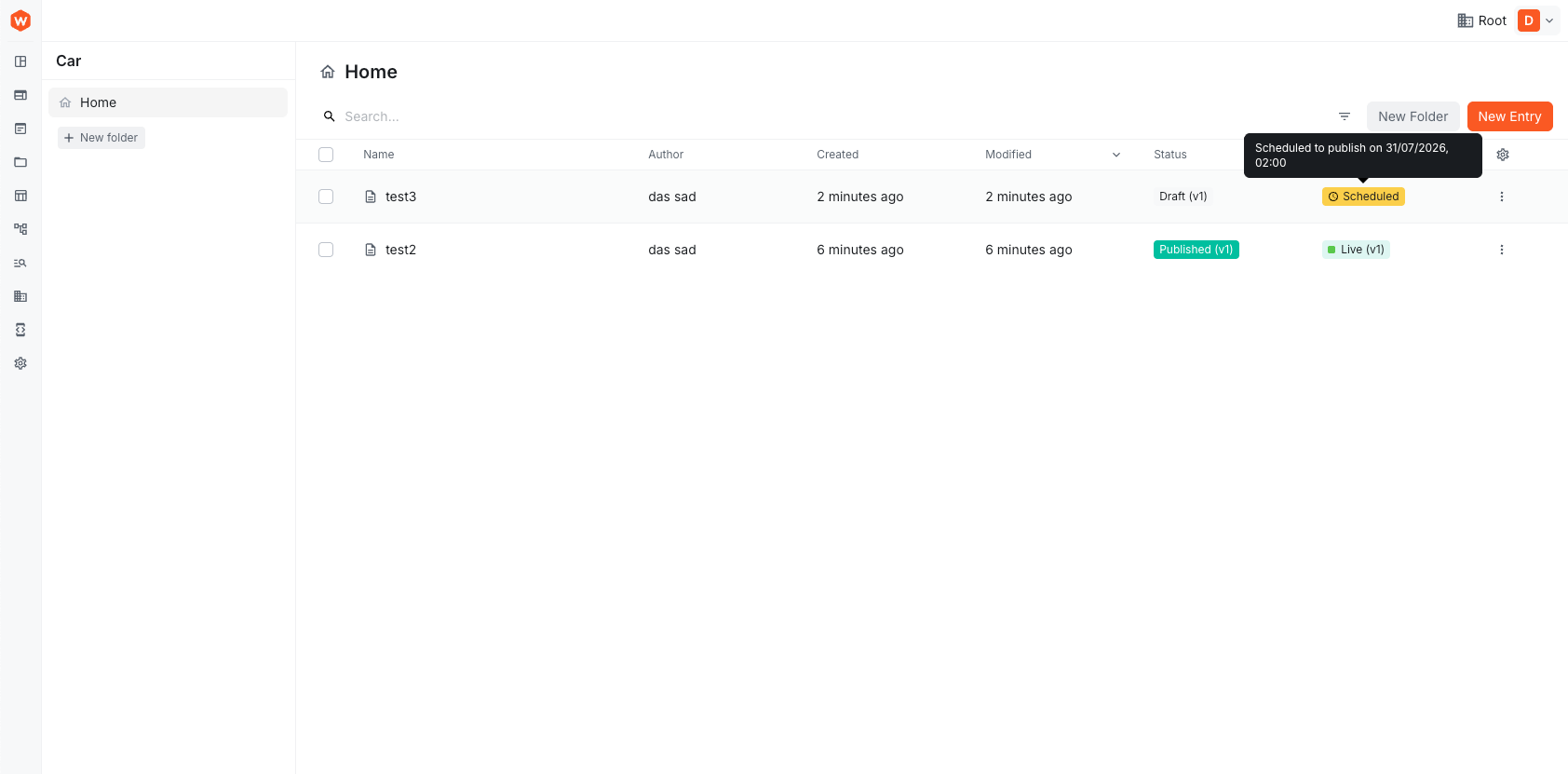 Entries list Live column showing a Scheduled pill with the go-live time
Stable_idProperty for Object and Dynamic Zone Field Values (#5606)
Object fields and dynamic zone fields now include a server-generated _id property on each value, giving external systems (comments, annotations, collaboration tools) a stable reference identifier for individual items within nested structures.
// Example GraphQL response with the new _id property
{
  "data": {
    "getArticle": {
      "authors": [
        { "_id": "abc123xyz456", "name": "John Doe" },
        { "_id": "def789uvw012", "name": "Jane Smith" }
      ],
      "content": [
        { "_id": "ghi345rst678", "_templateId": "heroBlock", "title": "Welcome" }
      ]
    }
  }
}
Key behaviors:
- IDs are auto-generated on create/update using a 12-character alphanumeric identifier
- Existing IDs are preserved when updating entries — only new items receive new IDs
- Client-provided IDs are accepted; duplicates within the same array are silently regenerated
- Existing entries return
_id: nulluntil re-saved (no data migration required)
Revision List Now Refreshes Automatically After Changes (#5614)
After creating or deleting a revision, the revisions drawer now re-fetches the list from the API. Previously, the list stayed stale until the drawer was closed and reopened.
Improved Revision List Actions and Visibility (#5616,#5617)
The revision number in the revisions list is now more visible, and the revision list actions have been reorganised for better usability.
Revision Management Improvements (#5618)
The content entry revision system received significant usability improvements across the revision drawer, entry list, and form interfaces.
Revision drawer & list:
- The revision list now refreshes automatically after creating, deleting, unpublishing, or editing a note
- Version numbers are more prominent — rows display
#N · Titleformat - Each revision shows a visible status tag (Draft, Published, or Previously published) instead of tooltip-only status
- Created-by and published-by information now appears on each revision
- You can add or edit notes on any revision, not just at publish time
- An alert banner warns when viewing an older revision with a link to the latest
- Unpublish action is available in the 3-dots menu for published revisions
Content entries table:
- The Live column now shows a relative timestamp indicating when content was last published
- Clicking the Live column header sorts entries by
lastPublishedOn
Entry form:
- Clicking ”+ New Revision” on a locked entry now navigates directly to the newly created revision URL
Timezone-Aware Scheduling (#5618)
The scheduler dialog now includes a timezone dropdown, allowing you to pick a scheduled time in any timezone. The picker converts your selection to UTC before sending to the backend. All scheduler date displays (alert bar, table tooltip, rescheduling dialog) now show consistent UTC+02:00 format instead of the browser’s inconsistent GMT+2 output.
Fixed Revision Note Updates Overwriting Latest Revision (#5618)
Editing a note on an older revision would inadvertently overwrite the latest revision’s content. A new updateRevision storage operation now writes only to the specific revision record without syncing to latest. This fix is implemented across DDB, DDB-ES, and SQL backends.
Fixed Stale Live Pointer After Deleting Published Revision (#5618)
Deleting the currently published revision left a stale live pointer on the entry. The system now correctly clears the live field when you delete a published revision.
Fixed Pattern Validator Crash With Null Flags (#5618)
Custom pattern validation fields with null or undefined flags caused new RegExp(regex, null) to crash. Falsy flags are now coerced to undefined, and validation errors now properly include field details in the GraphQL response.
Google AI Provider Support and Updated Model Lists (#5670)
Google is now available as an AI provider for AI Powerups, joining OpenAI and Anthropic. The integration uses Google’s Gemini models including gemini-3.8-flash, gemini-3.5-pro, and gemini-2.5-flash-lite among others.
Model lists for all providers have been updated to reflect current offerings:
- OpenAI: Added
gpt-6-astra,gpt-5.5-pro,gpt-5.2,gpt-5.2-pro,gpt-5,gpt-5-pro,gpt-5-mini, andgpt-5-nano - Anthropic: Added
claude-fable-5-1andclaude-opus-4-8, with flagship models now listed first - Google: 9 Gemini models available
AI models now expose deprecated and endOfLife dates when known, allowing you to see which models are approaching end-of-life. Deprecated models (o3-pro, o3, gpt-4.1-nano, o4-mini) remain available for existing presets but will be removed after their shutdown dates.
To use Google AI, set the WEBINY_API_GOOGLE_API_KEY environment variable or configure the API key through your provider preset.
Fixed Field Filtering and Sorting for Field IDs Containing Underscores (#5701)
Fields with underscores in their IDs (e.g., on_sale) were incorrectly parsed by the CMS query mappers. Filtering on on_sale_contains would fail with an error because the system only recognized the part before the first underscore as the field name. Sorting was even more problematic — sort directives like on_sale_DESC were silently dropped, causing queries to return unsorted results with no error.
Both mappers now correctly handle underscored field IDs:
- Filtering matches the longest possible field ID first, so
price_range_gtecorrectly routes toprice_rangeeven when apricefield also exists. - Sorting allows underscores within field names and validates against the full field ID.
Additionally, when combining an explicit values object with flat field keys in a filter, the two are now merged instead of one overwriting the other.
Edit Referenced Entries Inline via Drawer (#5440)
Reference field cards now include a pencil icon that opens the referenced entry in a drawer for inline editing. You can edit and save without leaving your current entry. The drawer stays open after save so you can continue editing, and the card updates immediately without a loading flash.
Bulk Action API Exposed via Webiny Package (#5411)
Custom CMS bulk actions can now be authored from your project using the public webiny package. Bulk actions are automatically run as background tasks and can include AI-powered content generation with real-time websocket progress.
import { EntriesBulkAction } from "webiny/api/cms/entry";
import { BulkActionFeature, BulkActionButton } from "webiny/admin/cms/entry/list";
import { CmsGenerateEntryContentUseCase } from "webiny/api/ai-powerups";
import { WebsocketEventHandler } from "webiny/admin/websockets";
AI Model Configuration Now Uses Capabilities and Roles (#5693)
AI features previously hardcoded the first configured model, requiring duplicate API key entries for multiple models from the same vendor. The configuration system now uses three distinct concepts:
- Connections store a vendor and credential pair, so one API key covers all models from that vendor.
- Model roles (
fast,standard,vision) let you assign models by purpose rather than per-feature. - Capabilities allow per-feature overrides when needed, with sensible defaults otherwise.
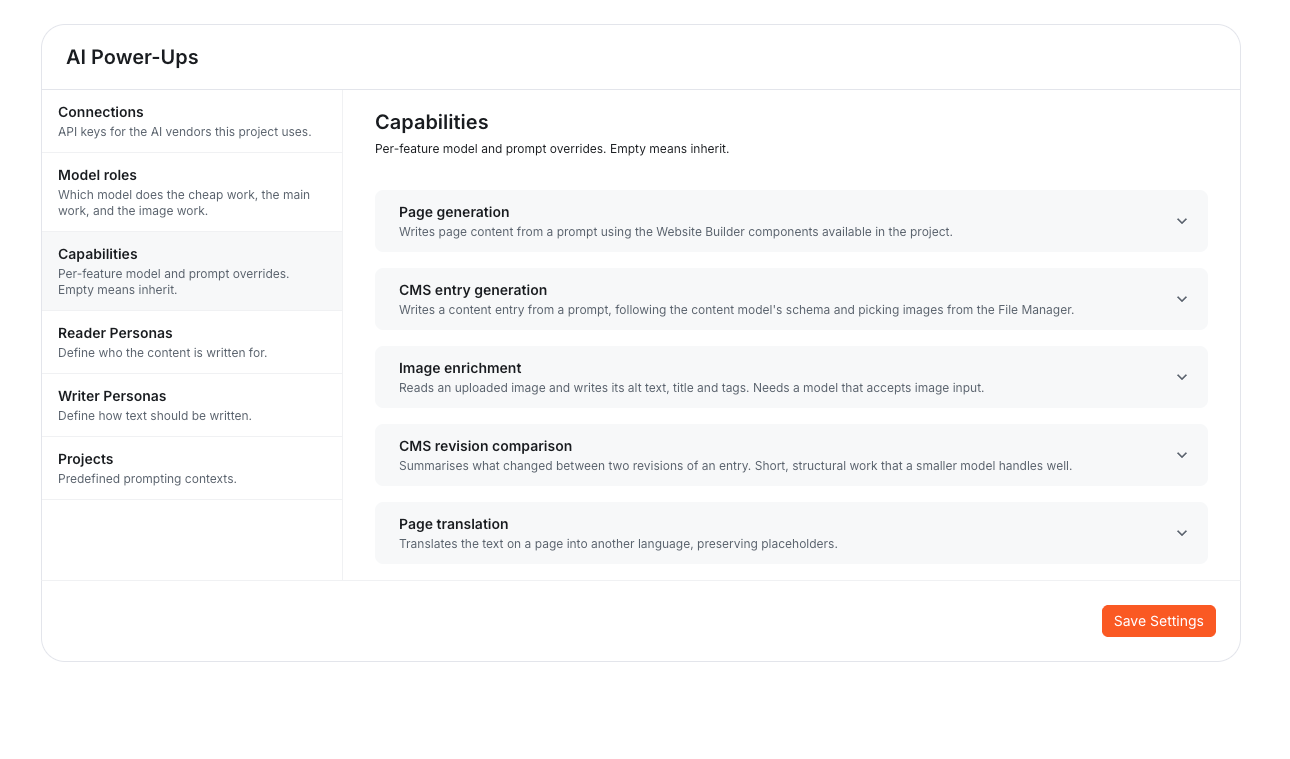 AI Power-Ups settings with Connections, Model roles, and the Capabilities list of per-feature overrides
Features declare which role they need, and the resolver picks the appropriate model. Projects upgrading from earlier versions have their existing configuration migrated automatically — the first preset becomes the standard role, preserving current behaviour.
AI features also now register their own capabilities alongside their code, so the settings screen stays in sync without manual updates. Extensions adding AI features get a settings row automatically.
The legacy providers configuration continues to work during the upgrade period but will be removed in the next major release.
Entry Collaboration With Comments and Notifications Inbox (#5619)
You can now leave comments directly on CMS entry fields, enabling real-time collaboration between content editors. Comments are anchored to specific fields — including individual items within repeatable fields — so discussions stay contextually relevant even as content changes.
A new notifications inbox surfaces comment activity, mentions, and other collaboration events in the Admin interface. The inbox integrates with the CMS comment system out of the box, and provides a bridge for custom notifications if needed.
Key capabilities:
- Field-level comments — attach comments to any entry field; nested and repeatable fields are supported via stable internal IDs.
- Notifications inbox — view and manage collaboration notifications from a central location in the Admin app.
- Automatic scroll and highlight — clicking a notification or comment reference scrolls to and highlights the relevant field in the entry form.
After upgrading, you will need to redeploy your API to enable the comments and notifications backend.
Fixed CMS Field Visibility and Access Control Rules Not Working in Content Entry Forms (#5766)
Conditional visibility and access control rules configured in the CMS model editor were not being applied when editing content entries. Several issues have been fixed:
- Comparison operators: The form only recognized basic operators (
eq,neq, etc.), while the CMS stores operators like==,!=,>,<,contains,startsWith, and their negated variants. All CMS operators are now supported. - Boolean comparisons: Rule values were being converted to strings, so conditions like
advanced == falsenever matched. Boolean values are now compared correctly. - Access control evaluation: The access control evaluator was incomplete and never matched any rules. A proper evaluator now checks
admin:<userId>andteam:<teamSlug>patterns against the current user, correctly hiding or disabling fields based on their access level.
Fixed List Order When Loading More Items (#5783)
Items loaded via “load more” in the CMS entries list appeared in the wrong position — often at the top instead of appended to the existing results. The internal cache was shared across views with different sort orders, causing the ordering to leak between views. List views now apply their own sorting after retrieving items from the cache.
Publishing No Longer Changes Saved/Modified Timestamps (#5783)
Publishing, republishing, or unpublishing an entry previously updated the savedOn, modifiedOn, savedBy, and modifiedBy fields. This caused entries to jump in lists sorted by these fields — sometimes disappearing past the loaded page. These meta fields are now preserved during publish operations and only updated when actual content changes.
Additionally, saving an entry without making changes no longer bumps timestamps. The system now compares normalized values and only updates meta fields when content differs.
Fixed Update Operations Erasing Delete/Restore History (#5783)
When updating an entry that had been deleted and restored from trash, the deletedOn, deletedBy, restoredOn, and restoredBy fields were incorrectly reset to null. The entry no longer recorded its trash history after a simple save. These fields are now preserved across updates unless explicitly overridden.
Fixed Republishing Older Revisions on DynamoDB (#5783)
Republishing an older revision (one that was already published but not the latest) failed with “Provided list of item keys contains duplicates”. The operation attempted to write the same record twice. This has been fixed.
Fixed Datetime Field Subtypes Preserving List Renderer (#5793)
Datetime subtype methods (.date(), .time(), .dateTimeWithTimezone(), .dateTimeWithoutTimezone()) now preserve the list renderer when applied to list fields. Additionally, .datetime() now defaults to .withTimezone(), and the DateTimeZ scalar is registered in the main GraphQL schema.
Lifecycle Events Disabled for Internal Private Models (#5792)
Private CMS models used internally by Webiny (files, folders, pages, workflows, etc.) now have entry lifecycle events disabled by default. These models already publish their own domain-specific events (File*, Folder*, Page*, etc.), so the generic Cms/Entry/* events were redundant noise.
If you have custom Cms/Entry/* event handlers targeting one of these internal private models, they will no longer fire. Use the model’s own domain events instead.
For custom private models, you can control this behaviour via the lifecycleEvents option:
builder.private({
    modelId: "myPrivateModel",
    name: "My Private Model",
    lifecycleEvents: false // disables Cms/Entry/* events
});
Fixed "Create From Revision" Failing for Entries With Dynamic Zone Fields (#5837)
Creating a new revision from a published entry that contained a dynamic zone field would fail with the error Field "_templateId" is not defined by type "Page_BlocksInput". The issue was that the “create from revision” operation wasn’t properly transforming dynamic zone data before sending it to the API. This has been fixed — dynamic zone fields are now correctly prepared across all entry operations.
Duplicate Content Entries (#5798)
You can now duplicate a content entry into a new draft entry. In the Admin, use the new Duplicate action in the content entries list. The API exposes a duplicate<Model> GraphQL mutation that clones all field values, automatically prefixes the title with “Copy of”, and creates the copy as a draft. Validation is skipped during duplication so unique-field constraints don’t block the copy.
The feature includes full lifecycle event support (onEntryBeforeDuplicate, onEntryAfterDuplicate, onEntryDuplicateError) through the EntryEventPublisher, and respects the lifecycleEvents: false setting for private models.
Display Validation Errors When Saving Entries Fails (#5794)
When the API rejected an entry save — for example, due to a unique constraint violation on Save & Publish — the error was discarded and the form showed nothing. Now, validation errors are mapped to their corresponding fields and displayed both inline and at the top of the entry form. Other failures appear as form-level errors. Errors are cleared automatically on the next submit.
Fixed DatePicker DateTime Values Not Saving Correctly (#5862)
The DatePicker component’s date-time variants (dateTimeTz and dateTimeLocal) had issues that prevented values from being stored and displayed correctly.
For fields with timezone (dateTimeTz), the picker emitted an invalid format that caused the input to stay empty — picked values were never actually saved. For fields without timezone (dateTimeLocal), the time was shifted by the browser’s UTC offset. Users in non-UTC timezones would pick 12:30 but see 18:00, with each re-pick adding the offset again.
Both variants now correctly round-trip values. Changing the timezone on a dateTimeTz field updates the value while preserving the picked wall time. Existing data displays as before — no migration is needed.
Fixed Content Entry Filtering by References (#5843)
Filtering content entries by reference fields was not working correctly in certain scenarios. The reference filtering logic has been fixed to properly handle all reference field queries.
Improved Reference Field Performance (#5843)
Reference field lookups have been optimized to reduce database queries when loading entries with multiple reference fields, improving API response times for content with complex reference structures.
SDK Methods Now Support Field Projections (#5928)
sdk.cms.getEntry and sdk.cms.listEntries now accept an optional fields array, letting you request only the data you need. Previously, these methods fetched all entry values by default, which could result in slow responses for models with many reference fields — each reference triggered a separate request to resolve it.
import { sdk } from "webiny/sdk-nextjs";

const entries = await sdk.cms.listEntries({
  modelId: "calendar",
  fields: ["entryId", "values.eventDate", "values.classRef.values.className"]
});
When you specify fields, the SDK returns the entry exactly as the API sent it and skips automatic reference resolution. Calls without fields behave exactly as before.
Fixed Advanced Search Filter for Reference Fields (#5936)
Reference fields could not be used in the Headless CMS entries advanced search filter. The field appeared in the field list, but no value input was rendered for it, making it impossible to filter entries by their references.
This has been fixed — you can now add reference field filters, search for and select an entry, and save the filter for later use. The filter uses “contains” / “doesn’t contain” conditions on the entry ID, consistent with how the GraphQL API handles reference filtering.
OpenRouter AI Provider Support (#5944)
AI Powerups now supports OpenRouter as a model provider. Add an OpenRouter connection in AI Powerups settings to access models from Anthropic, OpenAI, Google, Mistral, DeepSeek, xAI, Qwen, Moonshot, and Z.ai with a single API key. The provider includes 20 pre-configured tool-capable models, with openrouter/auto (OpenRouter’s Auto Router) available to let OpenRouter select the best model per request.
Reference Field Search Finds the Right Entries (#5971,#5998)
Searching in a reference field now reliably finds the entry you’re typing. Before, an entry with an exact title match, like “Boulder”, could show “No results”, or briefly appear and then get replaced by unrelated entries as you kept typing. Results now list exact title matches first, then titles that start with your text, then titles that contain it.
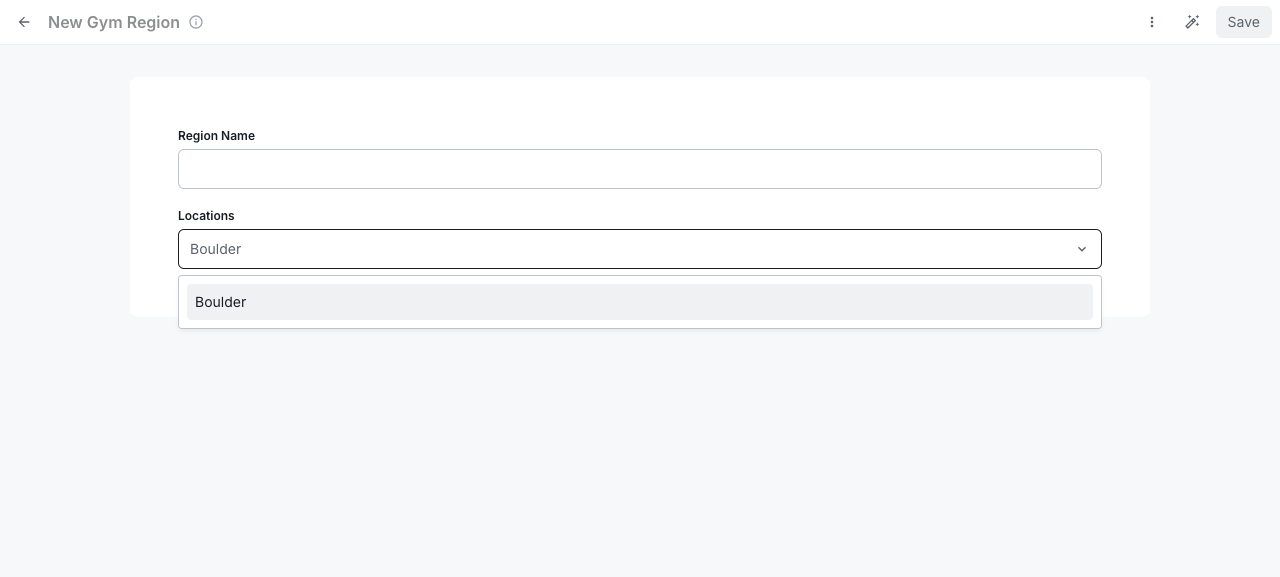 Reference field search showing the matching entry for the typed title
New Birthday Picker Renderer for Date Fields (#6021)
Date-only fields now support a Birthday Picker renderer designed for selecting dates far in the past—like birthdates—without clicking through hundreds of months. The picker displays as a DD / MM / YYYY bar that expands into a step-by-step card: pick a day, then a month, then a year (with the most recent years shown first).
fields.datetime().dateOnly()
    .dateGte({ expression: "today-100y" })
    .dateLte({ expression: "today-18y" }, "You must be 18 or older.")
    .renderer("birthdayInput")
The stored value remains YYYY-MM-DD, so you can switch existing fields to this renderer without affecting saved data. It works for both code-defined models and models built in the model editor.
Date Validators Now Support Relative Expressions (#6021)
The dateGte and dateLte validators can now accept dates relative to today, not just fixed dates. Use expressions like today-18y (18 years ago), today+1d (tomorrow), or today-6m (6 months ago).
fields.datetime().dateOnly()
    .dateGte({ expression: "today-100y" })  // no older than 100 years
    .dateLte({ expression: "today-18y" })   // must be 18 or older
In the model editor, date-only fields now offer a Relative to today option alongside fixed dates when configuring “Later or equal” and “Earlier or equal” validators.
Validator messages support a {date} placeholder that shows the resolved limit:
.dateLte({ expression: "today-18y" }, "Must be born on or before {date}.")Improved Default Messages for Date Validators (#6021)
Date validator messages now default to clearer text: “Must be on or after {date}.” and “Must be on or before {date}.” instead of the previous “Date/time is later than the provided one.” Existing custom messages on saved models are unchanged.
Fixed Fields With Multiple Validators Being Ignored (#6021)
Fields with two or more validator schemas weren’t being validated in entry forms—the validators were dropped instead of combined. This is now fixed; all validators on a field are applied correctly.
Website Builder
Editable Object and List Fields (#5295)
Object fields now work in the page editor. Previously, declaring an object input on a component rendered nothing. Object fields now appear as clickable rows that open slide-out panels containing their child inputs. Lists of objects show as reorderable rows with add/remove/move controls and an empty state. Nested objects stack panels over each other with backdrop dimming, and all values persist correctly through the round-trip.
Always Show "All Revisions" in Page Revision Menu (#5348)
The “All revisions” option in the revisions menu is now always visible when editing a page, regardless of how many revisions exist. Previously it could be hidden in certain states.
Redirects List Rewritten With ListView Component (#5261)
The redirects list has been rewritten using the new ListPresenter abstraction and ListView compound component. This fixes a bug where folders would not display correctly when a folder had subfolders but no redirect records.
NewcontentEntryInput Type for CMS-Connected Components (#5594)
Website Builder components can now consume CMS entries directly via a new contentEntry input type. This enables three modes of content binding:
- Manual single: Select a specific entry by ID
- Manual list: Select multiple specific entries
- Query: Define a dynamic query with model, sort, limit, and search parameters
import { createContentEntryInput } from "webiny/website-builder-sdk";

const input = createContentEntryInput({
  mode: "query",
  models: ["article"],
  query: {
    sort: "createdOn_DESC",
    limit: 10
  }
});
Content entries are resolved server-side during SSR, so pages with CMS-connected components render correctly on first load. A useContentEntryList React hook is available for client-side pagination in query mode.
Fixed Page List Order When Loading More Items (#5783)
Pages loaded via “load more” appeared at the top of the page list instead of in the correct sorted position. This affected both the page list and the redirects list. The ordering is now handled correctly by the view layer.
Fixed Preview Not Staying in Sync on Undo (#5884)
Typing in an element input and then pressing OS Undo changed the input value back, but the preview kept showing the typed value. The preview patch was applied against the preview’s own copy of the element, so a return to the committed value produced no patch. Preview patches are now diffed against what the preview currently shows, keeping the preview in sync with your edits.
Added Grid Background Behind Editor Preview (#5884)
The editor’s preview container now displays a grid background, making it easier to visualise element positioning and alignment while editing.
Fixed Primitive List Inputs Losing Items (#5894)
List inputs without child fields (such as tags) now correctly preserve all items when an element is created from component defaults or bindings. Previously, only the last item in the list was kept — for example, ["Autocomplete", "Limited AI integration"] would become just "Limited AI integration". This affected both the remote component editor after saving defaults and when adding such components to a page.
Added Missing Input Renderers for Tags, DateTime, and RadioGroup (#5893)
Components using createTagsInput, createDateInput, or createRadioInput from the Website Builder SDK previously showed “Missing renderer” errors in the editor sidebar because the corresponding renderers weren’t registered. All three renderers are now available:
Webiny/Tags— renders the admin-uiTagscomponentWebiny/DateTime— renders a date-time picker, saving values as ISO stringsWebiny/RadioGroup— renders radio buttons using the input’s configured options
Admin
Workflow State Folder Permissions (#5331)
Workflow states now respect Folder Level Permissions. Users only see workflow states for records in folders they can access — restricted users no longer see states for entries or pages outside their allowed folders. As part of this change, moving entries or pages with active workflow states is now blocked to prevent permission inconsistencies.
Real-Time AI Image Enrichment Notifications (#5326)
When you upload an image and AI finishes generating its tags and description, you now receive an on-screen notification in real time. Only the person who uploaded the image is notified, not everyone signed in.
Form Field Context and Navigation (#5330)
Form field callbacks can now navigate the form tree to access sibling and parent fields via IFieldScope and IFieldNavigator. This enables computed, hidden, disabled, and required callbacks that depend on related field values. Dynamic zone copy/paste is also now supported.
Renamed Frontend Integration API Key and Environment Variables (#5507)
The API key slug for frontend integration has been renamed from website-builder to frontend-integration, and environment variable prefixes now use NEXT_PUBLIC_WEBINY_. Existing projects using the website-builder slug will continue to work through a legacy fallback.
Tenant Theme Extension With Font Selector (#5507)
A new TenantThemeExtension has been added to the Next.js starter kit, enabling per-tenant theme customization including a font selector. Themes are merged at runtime based on the current tenant.
Injectable String Formatting in the Admin and the API (#5517,#5526)
StringFormatter and Slugify are now injectable features in both @webiny/app-admin and @webiny/api-core, and @webiny/api-core also gets DateFormatter. In the admin they replace direct imports of the slugify npm package scattered across presenters. Admin and server code now share one decoratable seam for slug generation and formatting.
Inject the formatter where you need it:
class MyRepository {
  constructor(private stringFormatter: StringFormatter.Interface) {}

  private makeSlug(name: string) {
    return this.stringFormatter.slugify(name);
  }
}
To override slug logic project-wide, decorate the fine-grained Slugify feature rather than the whole formatter. The same decorator works in the admin and on the API:
const MySlugify = Slugify.createDecorator(() => ({
  execute: value => value.trim().toLowerCase().replace(/\s+/g, "_")
}));

container.registerDecorator(MySlugify);
Fixed Redirect After Deleting the Current Folder (#5626)
When you deleted a folder while viewing it, you could end up stranded with no visible content. Now the UI automatically navigates to the nearest surviving ancestor folder (parent → grandparent → … → root) without requiring a manual navigation or page refresh. This also works when a folder is removed from the cache externally — for example, by another component calling useDeleteFolder. The fix uses optimistic cache updates instead of refetching from the API, avoiding issues with eventually-consistent storage.
Fixed Schema Validation for Empty Non-Required Fields (#5642)
Non-required fields with empty values (null or undefined) were incorrectly failing Zod schema validation, even though they should be allowed to remain empty. This affected scalar fields, object fields with all-empty children, and list fields with empty arrays. The validation logic now skips schema checks for non-required fields when their values are empty, while still validating populated fields and enforcing required field constraints as expected.
Unified Frontend Settings Configuration (#5667)
Frontend settings — including the preview domain and starter kit configuration — were previously tied to the Website Builder package. This made it awkward to configure frontend settings in projects not using Website Builder, or to share settings across multiple frontend frameworks.
A new @webiny/frontend-settings package now manages these settings centrally:
- New GraphQL API:
frontend { getSettings }andfrontend { updateSettings }provide a dedicated endpoint for frontend configuration, separate from Website Builder. - Unified “Configure Frontend” dialog: The Dev Tools dialog now includes a domain input field with save functionality. Starter kit configuration (Next.js, Nuxt) has been relocated here from Website Builder.
- New permission: A
frontend.settingspermission controls access to the frontend settings API. Website Builder’swb.settingspermission has been removed.
If you were using the Website Builder “Settings” menu item to configure the preview domain, use the “Configure Frontend” dialog in Dev Tools instead. The websiteBuilder { getSettings } query still works but now delegates to the new frontend settings repository internally.
Removed UnuseduseDataListanduseAutocompleteHooks (#5346)
The useDataList and useAutocomplete hooks in the @webiny/app package had no usage across the codebase and have been removed. If you were importing these hooks directly, you’ll need to implement equivalent functionality in your own code.
Command Palette With Global Search and Keyboard Shortcuts (#5432)
A new command palette is now available via ⌘K / Ctrl+K in the admin app. It provides fuzzy search over navigation destinations and registered actions, keyboard-driven navigation, and is styled according to the design system. The palette auto-derives navigation commands from your sidebar menus, supports detail views for commands that need input, and allows commands to register global keyboard shortcuts.
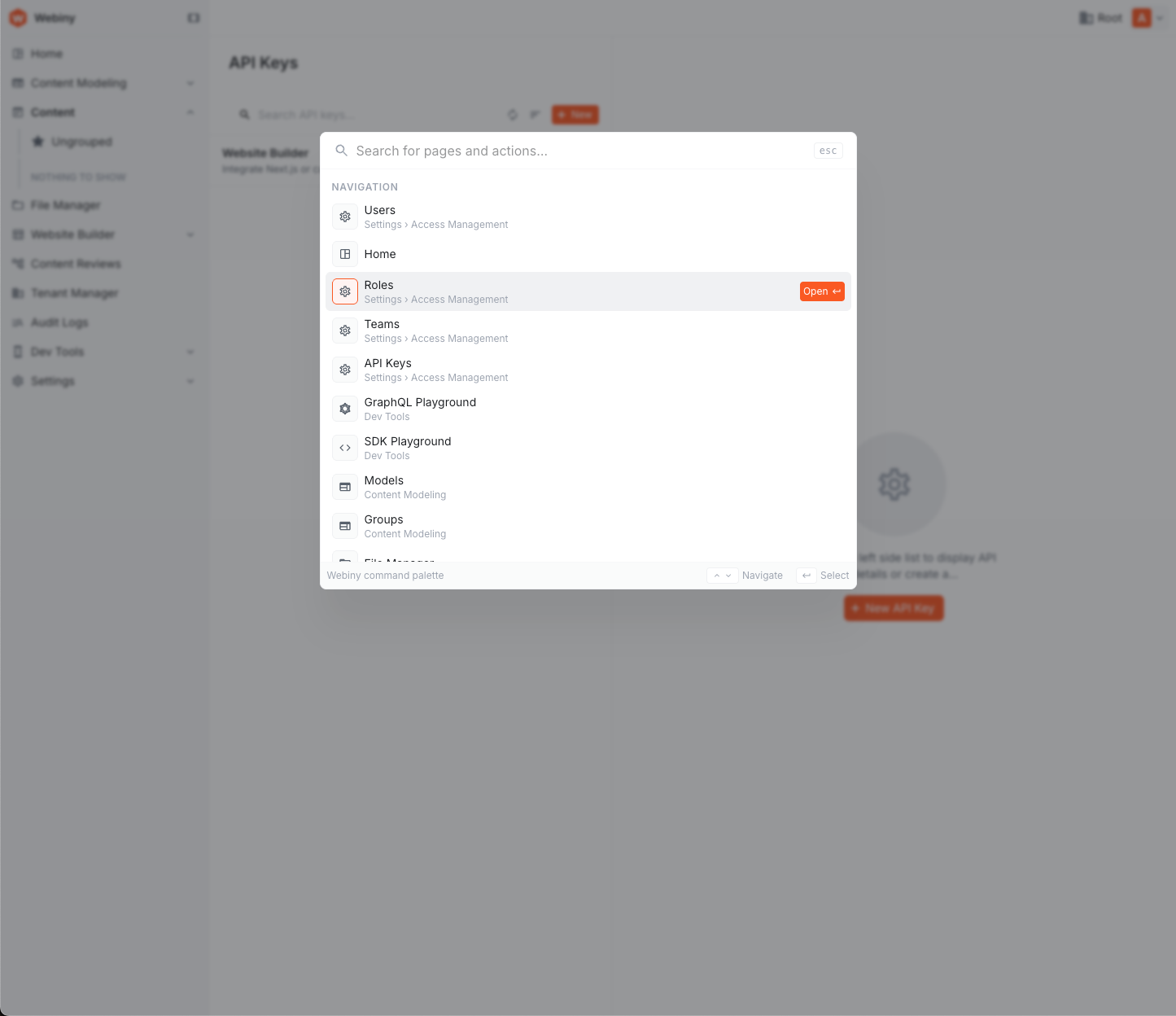 Command palette open over the admin app, listing navigation destinations
To register a custom command:
import { Command } from "webiny/admin";

class DeployCommand implements Command.Interface {
  name = "myapp.deploy";
  label = "Deploy";
  category = "Actions";
  shortcut = "cmd+shift+d"; // optional global hotkey
  execute() {
    // your action logic
  }
}

export const DeployCommandImpl = Command.createImplementation({
  implementation: DeployCommand,
  dependencies: []
});
Injectable Date Formatter for Consistent Date Display (#5512)
Date formatting across the admin was inconsistent. A new injectable DateFormatter feature in @webiny/app-admin provides a single, decoratable formatter that any admin module can use. The default format is YYYY-MM-DD HH:mm in 24-hour format using the browser locale.
To override the format project-wide:
import { DateFormatter } from "webiny/admin";

const MyDateFormat = DateFormatter.createDecorator(() => ({
  format: (date) => {
    // your custom format logic
  }
}));

container.registerDecorator(MyDateFormat);
Fixed Field Visibility Rules Inside Lists and Dynamic Zones (#5793)
Field visibility rules using the $.field syntax inside object lists and dynamic zones were not resolving correctly. Rules with == operators never matched, while != rules always matched regardless of the actual field values. List item children now receive an index-aware scope path, ensuring rules evaluate correctly for each item independently.
Fixed List Renderer Crash on Single-Value Fields (#5793)
The CMS form would crash with t.map is not a function when a list renderer was mistakenly applied to a single-value field (for example, dateTimeInputs without .list()). The form now falls back to the single-value renderer instead of crashing.
Preserve Partial GraphQL Response Data (#5876)
The admin GraphQL client previously threw whenever a response contained an errors array, discarding data entirely — even when data was fully populated. GraphQL partial-success responses (such as when a non-nullable reference field nulls out) carry valid data alongside errors. This caused issues like content entry lists rendering only folders with no entries, despite the API returning the records. The client now only treats errors as fatal when there is no data to return.
Object List Accordion Items Now Display Readable Titles (#6014)
When using object lists rendered as accordions, item titles previously displayed raw field values instead of human-readable labels. A text field with predefined values would show personal-training instead of Personal Training, and reference fields would fall back to generic labels like Facility Information #1 instead of the actual referenced entry’s title.
Accordion item titles now resolve to their proper display values:
- Predefined values show the option label, not the stored value.
- Reference fields show the referenced entry’s title (e.g.,
Bakerinstead ofFacility Information #1). - Multiple values are joined with commas.
- Object values fall back to a numbered label instead of
[object Object].
Reference titles are cached per session and batched into a single request per render pass, so this improvement adds minimal overhead.
Development
Custom GraphQL Playground Built From Scratch (#5357)
The GraphQL Playground has been completely rewritten, replacing the old CDN-loaded graphql-playground-react with a custom implementation built on Monaco Editor. The new playground includes several improvements:
- Schema Docs Explorer — a right-side drawer for browsing the introspected schema with stack-based type navigation, search across type names, field names, arguments, and enum values, and clickable type references
- Query History — localStorage-backed execution history (capped at 100 entries) with search, restore-to-active-tab, open-in-new-tab, and individual delete
- Tab-based architecture — each tab has its own GraphQL client with independent auth and tenant headers. System tabs (Manage, Read, Preview APIs) have read-only endpoints; duplicate them to get an editable copy
- Comment-preserving prettifier — formats queries while keeping your comments intact
The playground uses a DI-based PlaygroundTabRegistry, allowing any package to contribute its own tabs. If you need custom client behavior, implement PlaygroundClient.Interface or use the provided factories with custom getToken/getTenant overrides.
Removed Apollo Client From Multiple Packages (#5345,#5342,#5340,#5339,#5336,#5335)
Apollo Client has been removed from several packages including ACO, Audit Logs, File Manager, Website Builder, Workflows, and Cognito. These packages now use Webiny’s internal GraphQL client infrastructure instead.
OpenSearch Client Refactored to Use Dependency Injection (#5311,#5301)
The OpenSearchContext abstraction and context.opensearch/context.elasticsearch properties have been removed. All consumers now resolve the OpenSearch client directly via the OpenSearchClient dependency injection token.
import { OpenSearchClient } from "webiny/api-opensearch";

// Inject the client via DI instead of accessing context.opensearch
Removed Unusedapp-file-manager-s3Package (#5341)
The app-file-manager-s3 package has been removed as it was no longer used anywhere in the codebase.
TypeScript 7 and Dependency Updates (#5396)
Webiny now uses TypeScript 7.0.2. Most dependencies have also been updated to their latest compatible versions. If you encounter type errors after upgrading, ensure your IDE and local TypeScript version are in sync with the project.
Removed@svgr/webpackDependency (#5343)
The @svgr/webpack package has been removed from Webiny’s dependencies. If your project relied on this package for SVG handling, you may need to add it to your own project dependencies.
Lexical Editor Aligned With Design System (#5509)
The Lexical rich-text editor has been restyled to match the Webiny design system:
- Toolbar uses design tokens with rounded controls and proper hover/active states
- Icons migrated to
@webiny/iconsMaterial Symbols - Dropdown menus styled to match admin-ui patterns with check indicators for selected items
- Color picker uses square swatches with proper theme color borders and a no-color swatch option
- Link editor popover uses admin-ui form components and no longer opens at (0,0) when pressed with no selection
- Placeholder text shows for any empty block and matches the current block’s typography
AI Models Without Temperature Support No Longer Fail (#5883)
Several AI models (Claude Opus 4.7+, Opus 5.5, Sonnet 5.5, GPT-6.1 Sol, and others) reject the temperature parameter outright with a 400 error. Features like CMS entry revision comparison and page translation were passing temperature: 0.3, causing those features to fail on affected models. Webiny now checks each model’s capabilities from the WCP catalog and only sends temperature when the model supports it.
AI
AI Prompt File Attachments and Audit Logging (#5384)
You can now attach additional files (text, PDF, DOCX) to AI prompts in both the Headless CMS and Website Builder. The files are converted to markdown and included in the prompt context, allowing the AI to reference document content when generating responses.
AI operations are now recorded in the audit logs. Each generation creates a single merged record capturing the before/after state, with detailed tabs showing the system prompt, user prompt, and LLM response in the audit log viewer.
Audit Logs UI Improvements (#5384)
The audit logs interface has been updated with a filter drawer, improved date/time pickers with proper ISO output, and fixed pagination when scrolling through filtered results.
File Manager
File Type Filtering in File Picker (#5384)
The File Manager picker now respects the accept prop to filter file listings. When you specify accepted file types, only matching files are shown in the listing while folders remain visible for navigation. Duplicate selections in multi-file mode are also now prevented.
Image Delivery Pipeline With Server-Side Transforms (#5481)
Images served through the File Manager now support server-side transforms including crop, format conversion, and quality adjustments. When you edit an image’s crop or focal point — whether in the File Manager, CMS asset picker, or Website Builder — the transform parameters are encoded directly into the delivery URL.
The File Manager metadata structure has been updated:
metadata.imageEditmoved tometadata.imagehotspotrenamed tofocalPointthroughout- New fields:
metadata.image.{crop, focalPoint, alt, caption}
Shared Image Editor Component (#5481)
A unified ImageEditor component now powers image editing across the File Manager, CMS asset picker, and Website Builder file inputs. This provides a consistent editing experience with crop handles and focal point selection regardless of where you’re working with images.
Uploaded Files Now Inherit the Scope Tag (#5929)
When File Manager was opened with a scope parameter, it correctly filtered the file list to show only files tagged with that scope. However, files uploaded from within that scoped view were saved without any tags, meaning they wouldn’t appear in the same scoped File Manager that uploaded them. Uploads made from a scoped File Manager are now automatically tagged with the scope, so they correctly appear in the filtered view.
Webiny SDK
Unified Asset Type (#5481)
The SDK now exports a canonical Asset type shared by both the CMS asset field and Website Builder file inputs. This removes the previous duplicate type definitions.
All Webiny-prefixed names have been simplified:
WebinyImage→ImageWebinyAsset→AssetgetWebinyAssetUrl→getAssetUrl
import { Asset, getAssetUrl } from "webiny/sdk";

const url = getAssetUrl(asset, { width: 800, format: "webp" });
Unified Frontend SDK With Result-Based API (#5507)
The frontend SDK packages have been consolidated into a single unified entry point. The new @webiny/sdk-frontend and @webiny/sdk-nextjs packages replace the previous @webiny/content-sdk and @webiny/content-sdk-nextjs packages.
Initialize the SDK once with sdk.init() to access all domains — CMS, Website Builder, languages, file manager, and more — through a single configuration:
import { sdk } from "webiny/sdk-nextjs";

sdk.init({
  endpoint: "https://your-api.webiny.com/graphql",
  token: "your-api-token",
  tenant: "root"
});

const result = await sdk.cms.entries.list({ model: "article" });
All SDK methods now return Result<T, Error> for consistent error handling across the frontend.
The configuration props have been renamed: apiHost → endpoint, apiKey → token, apiTenant → tenant.
Fixed Stale Language Cache in Create Page Dialog (#5507)
Adding a new language in the Admin and then opening the Create Page dialog would show stale language options until a page reload. The CreateEntryRepository, UpdateEntryRepository, and DeleteEntryRepository now publish lifecycle events (EntryAfterCreateEvent, EntryAfterUpdateEvent, EntryAfterDeleteEvent) that keep the frontend cache in sync.
Page Builder
AI-Powered Page Translation (#5501)
You can now translate pages using AI directly from the Page Builder. When you have an AI provider configured in AI Power-Ups settings, the translate page dialog will use AI to translate the page title, snippet, and all text content within the page. For Latin-script languages (e.g., Croatian, Spanish), the page path slug is also translated automatically. Non-Latin languages (e.g., Russian, Japanese) keep the original slug to avoid URL encoding issues.
The translation works as a decorator on the built-in TranslatePageUseCase, so if no AI provider is configured, the page is still cloned as before — AI translation is a graceful enhancement rather than a requirement.
Breaking Changes
Entry Data Factories Now ReturnResultInstead of Throwing (#5783)
The five entry data factories exported from webiny/api/cms/entry now return a Result type instead of throwing exceptions. If you’re calling these factories directly in custom code, you’ll need to update your error handling:
import { createEntryDataFactory } from "webiny/api/cms/entry";
import { isFail } from "webiny/api";

const result = await factory.create(/* ... */);

if (isFail(result)) {
  // Handle the error
  console.error(result.error);
  return;
}

const { entry } = result.value;